



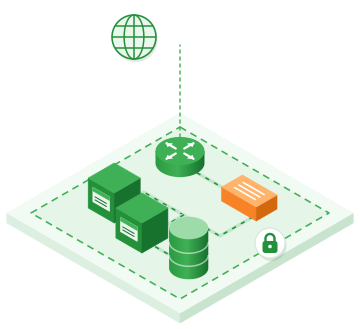
Virtual data center: router, load balancer, instances and database in an isolated space

What is a virtual data center?

A virtual data center (VDC) reproduces in software what a server room contains: servers, routers, firewalls, VPNs and storage. At PYSOFT, a VDC corresponds to an organization: an isolated space, with its own routing table, networks, quotas and members.

You create your resources when you need them and delete them when you no longer have a use for them. Consumption is measured continuously, based on public hourly prices.

VDC or dedicated server?

A dedicated server is a physical machine rented in full, with fixed capacity. In a VDC, capacity is adjusted on demand, resource by resource: you add a VM, a volume or a network in minutes, and your disks are replicated across several servers.

You keep control of your systems (administrator access, choice of operating system) without managing the hardware, the power or the physical network.

Quotas and cost control

Each VDC has quotas: vCPUs, memory, storage, public IPs, Kubernetes clusters… They are checked atomically, so two simultaneous requests cannot exceed them. They are defined with you and raised on simple request.

The cost of a VDC is the sum of the resources it contains, at the prices in the price list. The simulator gives you the total excl. VAT and incl. VAT before you start.

Members, roles and single sign-on

Your team members sign in through a shared identity portal, with two-factor authentication, or with your company account (OpenID Connect federation). Each member has a role that defines what they can do, and every action is recorded in the audit log. For your scripts and Terraform, application credentials carry the permissions of a role, with no password sharing.

Virtual data center

At a glance

Instances

Linux, OpenBSD and Windows VMs, with optional NVIDIA A2 GPUs.

Private networks and VPN

Routed and isolated networks, public IPs, IPsec and WireGuard VPN.

Firewall for each VM

OpenBSD's pf firewall, with security groups.

Load balancers

TCP, HTTP and HTTPS load balancing, automatic Let's Encrypt certificates.

Storage, backup, CDP

Volumes stored in three copies, scheduled backups, restore to the second.

Members, roles and audit

Single sign-on, two-factor authentication, a log of every action.

Costed example

Example: a complete web application

  • 2 × m1.medium2 vCPU · 4 GB RAM · 40 GB SSD 8,478.00 DZD
  • 1 × m1.large4 vCPU · 8 GB RAM · 80 GB SSD 8,478.00 DZD
  • Additional SSD storage100 GB 2,160.00 DZD
  • Public IPs (EIP)1 IP 750.00 DZD
  • 1 × Load balancer Small 15,000 max. connections 3,780.00 DZD

Total23,646.00 DZD excl. VAT/month

or 28,138.74 DZD incl. VAT/month

Two web servers behind a load balancer, a database with 100 GB of additional storage and a public IP: a common architecture for a website or a business application.

Adjust in the simulator
Process

How it works

Step 1

Definition

We define the quotas and the initial architecture with you: networks, VMs, security.

Step 2

Creation

We create your organization; your team members sign in to the portal.

Step 3

Autonomy

You create your resources yourself, or ask the AI assistant for them; our support remains available 24/7.

Frequently asked questions

Good to know

An isolated space in the cloud where you have your own VMs, networks, firewall, VPN, storage and load balancers. At PYSOFT, each VDC is an organization, with its own routing table, quotas and members.

The price list includes no fixed fee for the VDC itself: you pay for the resources it contains, for example 2,119.50 DZD excl. VAT per month for an m1.small instance and 750.00 DZD excl. VAT for a public IP. The simulator calculates the total for your configuration.

Yes. Each team member signs in with their own credentials (two-factor authentication, or your company account), and their role defines what they can do. Every action is recorded in the audit log.

Yes, at any time: you can add instances, volumes, networks or public IPs. If a quota is reached, just ask us to raise it.
PYSOFT Cloud

The other services in your VDC

How the PYSOFT cloud works

The PYSOFT cloud combines proven building blocks (OpenBSD, KVM, etcd, pf, relayd) around simple, auditable code. The goal: to offer …

Virtual servers hosted in Algeria

Virtual servers hosted in Dellys and billed in dinars: choose a predefined configuration or build your VM by the vCPU, …

Encrypted VMs, from disk to memory

Encrypt each VM's disk with AES-256 using a key unique to that VM, and its memory with the AMD processor. …

Appstore: your applications ready in minutes

Choose an application and a VM size: the platform takes care of the rest, from installation to HTTPS, including the …

Autoscaling: your servers follow the load

An instance group adds VMs when the load goes up and removes them when it goes back down. You pay …

Routed SDN network: private networks and public IPs

Each organization has its own network, isolated from the others at the routing level. Your VMs communicate with each other …

Firewall as a Service (FWaaS) based on pf

Every VM has its own firewall, applied on its interface by pf, OpenBSD's firewall. You get the fine-grained control of …

VPN as a Service: IPsec and WireGuard

Connect your offices and your team members to your private network in the cloud, without exposing your servers to the …